How Much Does It Cost to Build an App in 2026? A Small Business Price Guide
Want to build your own app?
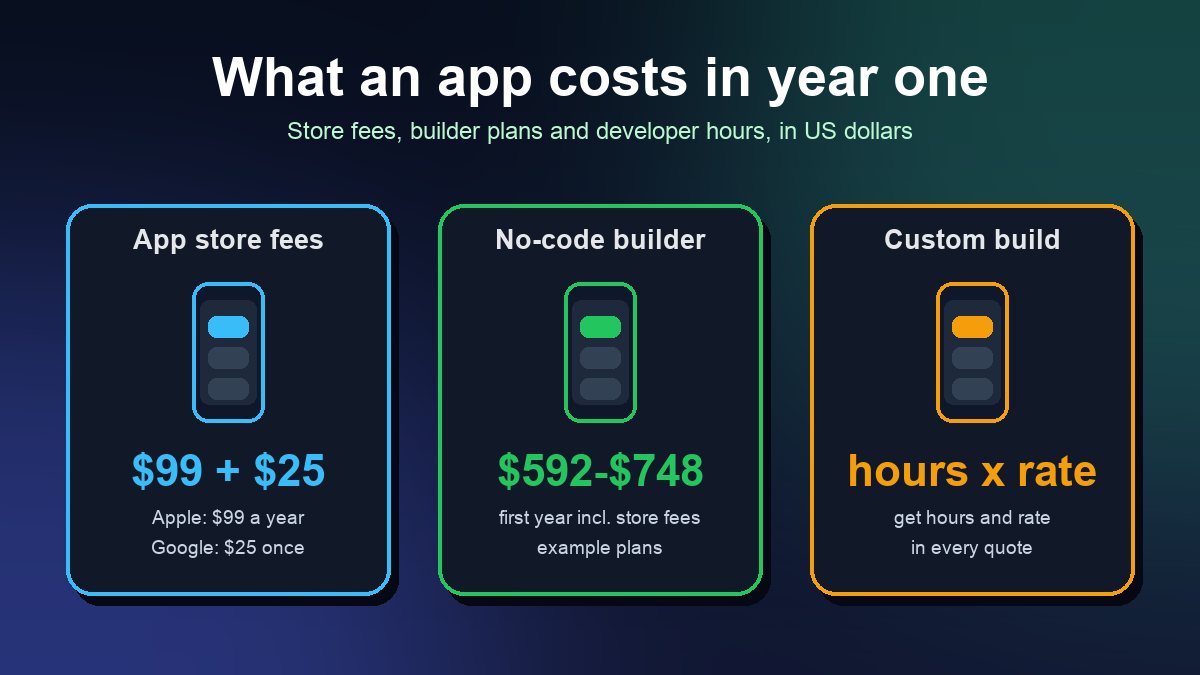
Start Building FreeShort answer: A small business can get a simple app into the Apple App Store and Google Play for well under $1,000 in the first year by using a no-code app builder. Builder plans that can publish to the stores currently start at about $39 to $65 a month, Apple charges $99 a year and Google charges a one-time $25. Hiring a developer or agency is a different scale: you pay for hours, and even a small custom app usually takes hundreds of them. The rest of this guide shows where every dollar goes, so you can build a budget from your own numbers instead of a vague "it depends."
All prices below are in US dollars and were checked on the vendors' own pages on 25 October 2026. Prices change often, so treat them as a starting point and confirm before you buy.
The fixed costs every app has
Whichever way you build, two fees come from the app stores themselves:
- Apple Developer Program: $99 per membership year to publish on the App Store. Apple offers a fee waiver to eligible nonprofits, accredited educational institutions and government entities.
- Google Play Console: a one-time $25 registration fee for a developer account.
If your app sells digital goods or subscriptions, the stores also take a commission on those sales (15% for developers in Apple's and Google's small-business rates, otherwise up to 30%). Physical goods and in-person services, like a restaurant order or a salon booking, are normally paid through your own card processor instead. Our guide to App Store and Google Play fees covers the rules in detail.
Path 1: a no-code app builder
This is the cheapest route and the one most small businesses should price first. You pay a monthly subscription, build the app yourself with templates and drag-and-drop screens, and the builder handles most of the technical work of publishing. Here is what three popular builders list today:
| Builder | Entry paid plan | Higher plans | Good to know |
|---|---|---|---|
| Adalo | Builder: $65/month, or $624/year billed yearly | Business: $200/month ($1,920/year) | Builder plan includes 2 published apps and publishing to the stores and web |
| FlutterFlow | Basic: $39/month | Growth: $80 first seat/month; Business: $150 first seat/month | Annual billing saves about 25%; Basic includes code download and one-click App Store deployment |
| Glide | Basic: $25/month | Plus: from $50/month; Pro: from $125/month | Current plans focus on business apps built from a spreadsheet, prompt or file, priced with AI credits |
A realistic first-year budget for one small app on a no-code builder looks like this:
- Adalo Builder billed yearly ($624) + Apple ($99) + Google ($25) = $748
- FlutterFlow Basic paid monthly ($468) + Apple ($99) + Google ($25) = $592, plus any backend costs (see below)
The real extra cost on this path is your time. Expect to spend evenings and weekends learning the tool, designing screens and testing. If that time is worth more to you than the savings, a freelancer who already knows the builder can set it up for you, and you keep paying only the subscription afterward. For a walk-through of the build itself, read how to build a mobile app without coding, and compare more tools in our app builder platforms comparison.
Path 2: hiring a developer or agency
Custom development is priced by time: total cost = estimated hours x hourly rate. Ask every quote for both numbers, not just a total.
For context on rates, the US Bureau of Labor Statistics reports a median annual wage of $135,980 for software developers in May 2025, and a median of $64.44 an hour for software developers, quality assurance analysts and testers as a group. That is what employees take home before benefits. Freelancers and agencies charge more per hour than that, because their rate also has to cover taxes, tools, sales time and project management.
Here is how the maths works with example numbers (illustrations, not market averages):
- 300 hours x $90 an hour = $27,000
- 600 hours x $120 an hour = $72,000
A quote far below what the hours could plausibly cost usually means a template app with your logo on it, an offshore team you will manage yourself, or a scope that leaves out things you need. None of those is automatically bad, but you should know which one you are buying.
What makes an app cost more
On both paths, the price climbs with the features you add. These are the usual big ones:
- User accounts and logins. Sign-up, password reset and profiles add screens and security work. Phone number login by SMS is also billed per message on services such as Firebase.
- Payments. Taking card payments for orders or bookings needs a processor and careful testing. See how to add payment processing to your app.
- Real-time features. Live chat, driver tracking and instant notifications cost more to build and to run.
- Connections to other systems. Linking your POS, booking calendar or CRM is often the most expensive single item in a custom quote.
- An admin dashboard. You need a way to update menus, prices and content without calling a developer.
- Both iOS and Android. Most builders and cross-platform frameworks cover both from one project. Two fully separate native apps mean two codebases to build and maintain.
- Accessibility and privacy work. Apple requires privacy details for your App Store listing and Google Play requires a Data safety form. Building with readable text sizes, labels for screen readers and good color contrast from day one is cheaper than fixing it later.
Running costs after launch
An app is a monthly cost, not a one-time purchase. Budget for:
- The builder subscription, if you used one. On most builders a published app depends on an active paid plan, so check what happens if you cancel.
- Apple's $99 renewal every year.
- Backend and hosting. Many apps store data in a service such as Google's Firebase. Its no-cost Spark plan includes, for example, 1 GiB of stored Firestore data, 50,000 document reads a day and 20,000 writes a day. Above those limits, the pay-as-you-go Blaze plan bills for usage.
- Updates. Apple and Google release new OS versions every year, and apps need occasional fixes to keep working and to meet new store requirements. If you hired a developer, ask for a monthly maintenance price up front.
- Card processing fees on every order you take in the app.
A five-step budget you can fill in today
- List the screens and features your first version must have. Cut everything that can wait for version two.
- Price the no-code path first: 12 months of the builder plan that includes publishing, plus $99 and $25.
- Get two or three custom quotes with hours, hourly rate and a monthly maintenance price for each.
- Add 12 months of running costs to each option: backend, renewals, updates and processing fees.
- Compare against the money the app should earn or save. For a restaurant, that might be commissions saved on orders moved from delivery apps (see building your own delivery app). For a gym or salon, it might be fewer no-shows and more repeat bookings.
If the numbers do not work, a mobile-friendly website with online ordering or booking may do the job for less. Our comparison of mobile apps and websites helps you decide, and the app launch checklist covers what to prepare once you commit.
Sources: Adalo pricing, FlutterFlow pricing, Glide pricing and Firebase pricing (all checked 25 October 2026); Apple Developer Program enrollment and Apple membership fee waiver; Google Play Console Help, Get started with Play Console; US Bureau of Labor Statistics, Occupational Outlook Handbook: Software Developers. Example figures are illustrations, not quotes.
Frequently asked questions
Can I build an app for free?
You can build and test one for free. Adalo, FlutterFlow and Glide all have free plans for building. Publishing to the App Store and Google Play needs a paid builder plan in most cases, plus Apple's $99 a year and Google's $25 one-time fee.
Is a no-code app good enough for a real business?
For booking, ordering, loyalty, event and content apps, usually yes. Custom development makes more sense when you need deep connections to existing systems, unusual features or very high traffic. Many businesses start on a builder and move to custom code only once the app has proved its value.
Do nonprofits pay Apple's $99 fee?
Eligible nonprofits, accredited educational institutions and government entities can apply for Apple's membership fee waiver when they enroll in the Apple Developer Program.