How to Build an App in ChatGPT or Claude: What to Expect
Want to build your own app?
Start Building FreeShort answer: Since 20 October 2026 you can build a working business app without leaving ChatGPT or Claude. Jotform released an App Builder that plugs into both assistants: you connect your Jotform account, describe the app in plain English, refine it by chatting, and then publish and share it. What you get is a Jotform App, a set of pages, forms, payments and user permissions that people open from a link or QR code. It is not a native App Store or Google Play listing. For booking, registration, client-portal and internal-tool apps that is often enough. For anything that needs a store presence, device features or custom logic, treat the chat version as a fast prototype.
Below: how to set it up in each assistant, a prompt that produces a usable first draft, the limits worth knowing before you share it with customers, and how to decide whether to keep it or move to a dedicated builder. If you are new to no-code tools in general, start with the guide to building a mobile app without coding.
What actually launched
Jotform announced the Jotform App Builder for ChatGPT and Claude on its blog on 20 October 2026. In ChatGPT it appears as a plugin. In Claude it is a connector in the connector directory. Both call the same Jotform Apps product that Jotform has offered for about five years, so the app is stored in your Jotform account and you can keep editing it in Jotform's normal editor afterwards.
According to Jotform's product pages, a chat-built app can include:
- Pages, layouts, branding and widgets that you adjust by asking for changes
- Forms for registrations, requests, orders and submissions, with workflows behind them
- Users and permissions, so staff or customers only see what they should
- Payments for bookings, orders, services and registrations
- Publishing and sharing by link, email or QR code (Jotform says the app can then be downloaded to any smartphone or computer)
Jotform's own examples are a customer portal, an employee onboarding hub, a CRM-style app, a booking system and an event app. That is the job it is built for: collecting information and payments, and putting your resources in one place.
How to set it up in Claude
Jotform's help article (updated 19 October 2026) lists these steps:
- Open a new chat in Claude, click the + icon at the bottom-left of the message box, hover over Add connector and choose Browse connectors.
- Search for Jotform App Builder and click Connect.
- Log in to Jotform, or create a free account, when asked. A checkmark shows the connector is active.
- Describe the app, and name the tool in your prompt ("Using Jotform App Builder, create…") so Claude actually uses it.
- Answer the permission prompt with Allow once or Always allow.
- When the draft appears, choose Edit in Jotform to fine-tune it in the full editor, or Share App to publish it.
While you are experimenting, Allow once is the more careful choice: you approve each action Claude takes on your Jotform account before it happens.
How to set it up in ChatGPT
The ChatGPT flow has three moves. Connect the Jotform App Builder plugin from Jotform's ChatGPT page and sign in to Jotform. Describe the app you need; Jotform suggests internal tools, client portals, booking systems, CRM apps and event hubs. Then keep refining it in the conversation before you set access, publish it and share it. If you cannot find the plugin or connector option in either assistant, check whether your plan or a workspace admin restricts third-party apps.
A prompt that gives you a usable first draft
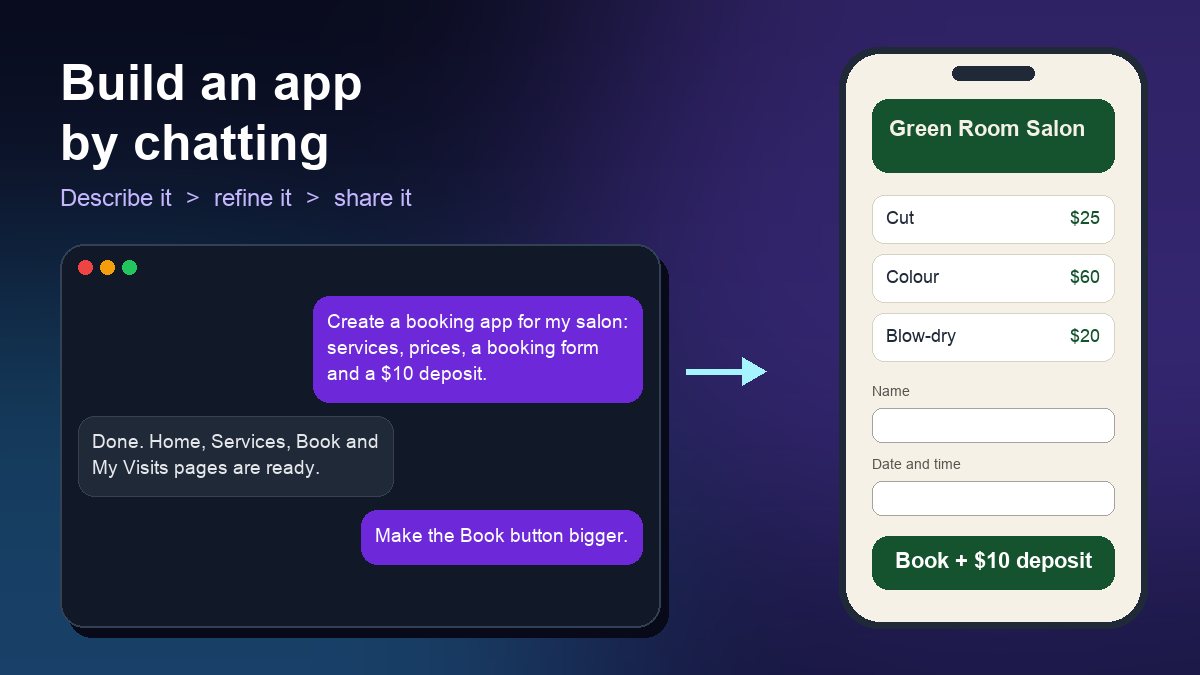
Vague prompts produce vague apps. Give the assistant the brief you would give a freelancer: who uses the app, what they need to do, what you need to collect, and who may see the data. For a small salon, that could look like this:
Using Jotform App Builder, create a booking app for a two-chair hair salon. Pages: Home (opening hours, address, call button), Services (cut, colour and blow-dry with prices and durations), Book (form: name, phone, service, preferred date and time, notes) and My Visits for returning clients. Take a $10 deposit on bookings. Staff can see all bookings; clients only see their own. Use dark green and cream with our logo.
Then make one change at a time: "make the Book button bigger on the home page", "add a cancellation policy above the deposit field", "email me for every new booking". Small requests are easier to check than one long list. For ideas on what a booking app should include, see why every salon needs a booking app.
Limits to check before you share it
It is not a store app. Jotform's pages describe sharing by link, email or QR code and installing from that link. They do not describe an App Store or Google Play listing. If customers expect to find you in the stores, you need a builder that publishes there, plus the developer accounts explained in App Store and Google Play fees in 2026.
Your Jotform plan sets the ceiling. The app's forms and payments run on your Jotform account. On Jotform's pricing page in October 2026, the free Starter plan allows 5 active forms, 100 submissions a month and 10 payment submissions a month, and shows Jotform branding. Bronze costs US$39 a month (US$34 a month billed yearly) and raises those to 25 forms, 1,000 submissions and 100 payment submissions. A busy booking app can reach the free limits within weeks, so check them against your expected monthly bookings.
The assistant is only the editor. The chat creates and changes the app; your customers never talk to ChatGPT or Claude. What they submit is stored in your Jotform account, so Jotform's terms and your own privacy notice are what matter. Avoid pasting real customer lists into the chat while you build.
Forms first, not logic first. These apps are made of forms, widgets and resources. That covers registrations, orders and portals well. It is a poor fit for a game, a two-sided marketplace, offline use, or anything that needs the phone's camera, GPS or Bluetooth in a custom way.
Test it on real phones. Open the share link on an iPhone and an Android phone, submit a test booking, pay a test deposit and confirm the notification arrives before you print a QR code for the counter.
Chat-built app or dedicated app builder?
| Chat-built Jotform App | Dedicated mobile app builder | |
|---|---|---|
| First draft | Minutes, from one prompt | Hours to days, usually from a template |
| How people get it | Link, email or QR code | App Store and Google Play listings, often plus a web version |
| Best for | Bookings, registrations, portals, internal tools | Ordering, loyalty and branded customer apps |
| Costs to watch | Jotform plan limits on forms, submissions and payments | Builder subscription plus Apple and Google developer fees |
| Editing later | In the chat or in Jotform's editor | In the builder's visual editor |
A sensible path for many small businesses is to use the chat builder to test an idea with real customers for a few weeks. If people use it, the pages, fields and steps you settled on become the brief for a store app. For a side-by-side look at the main tools, see app builder platforms compared. If you are not sure you need an app at all, read mobile app vs website first.
Where a chat-built app fits best
- Events: registration, schedule, resources and payment behind one link. Nonprofits comparing tools can also read event management software for nonprofits.
- Service businesses: bookings with deposits, intake forms and a client area.
- Internal teams: request forms, onboarding checklists and documents, with access limited to employees.
- Clubs and communities: membership sign-ups, dues and a shared resource library.
FAQ
Is it free?
Jotform describes its app maker as free, and the Starter plan costs nothing, but its limits are low: 5 active forms and 100 submissions a month. Paid Jotform plans start at US$39 a month.
Can I publish the app to the App Store or Google Play?
Not from the chat. Jotform's materials cover sharing by link, email and QR code. For a store listing, use a builder that publishes to the stores and budget for Apple's US$99 yearly and Google's one-time US$25 developer fees. The step-by-step process is in the guide to submitting an app to the Apple App Store.
Do my customers need ChatGPT or Claude?
No. They open the published app from your link like any other web page or installed app. Only you use the assistant, and only while building or editing.
Can the app take payments?
Yes. Jotform lists payments for bookings, orders, services and registrations, but the free plan stops at 10 payment submissions a month. For the wider picture, see adding payment processing to your app.
Sources: Jotform, Announcing Jotform App Builder for ChatGPT and Claude (20 October 2026); Jotform Help, How to Create an App in Claude using Jotform Apps Connector (updated 19 October 2026); Jotform App Builder for ChatGPT; Jotform Apps; Jotform pricing (checked 23 October 2026).